Project Planning Template
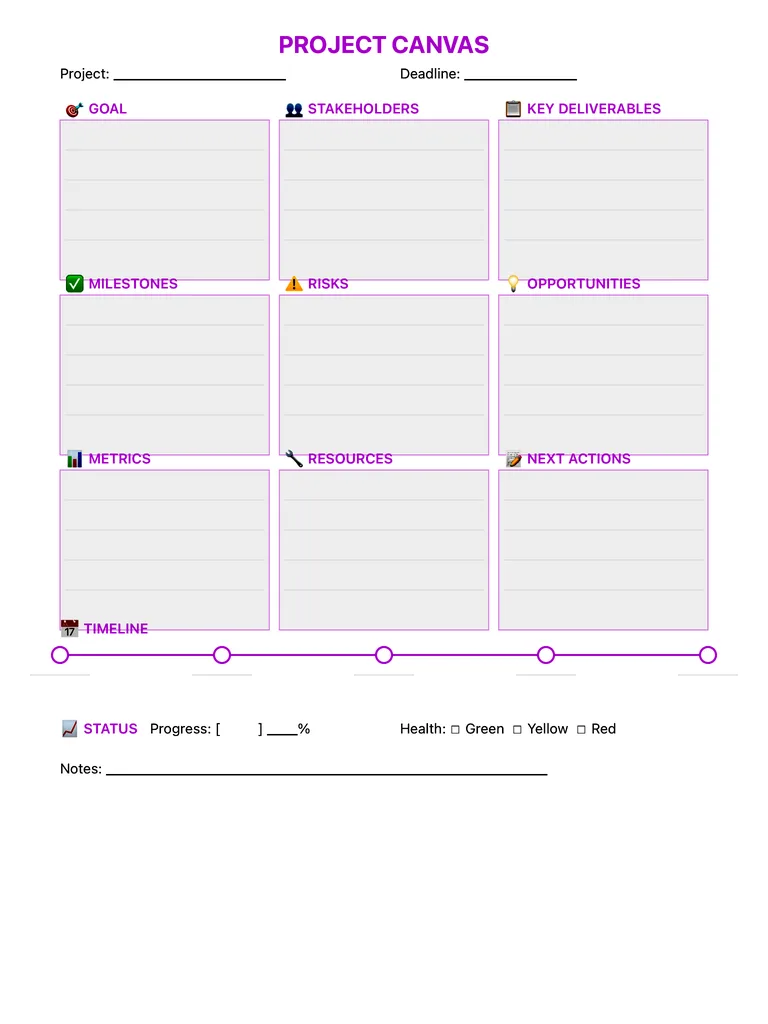
A one-page project canvas: goal, stakeholders, deliverables, milestones, risks, opportunities, metrics, resources, next actions and a timeline on a single sheet. Print it or sketch your plan with Apple Pencil.
Free · no sign-up · PDF works for printing and in any note app (Goodnotes, Notability, Notes for iPad). Premium template in the app.
About this template
See your entire project on one page with this visual planning framework. Define the goal, identify stakeholders, list key deliverables and milestones. The risks and opportunities sections force you to think ahead about what could go wrong or accelerate success. Resources and metrics ensure you have what you need and can measure progress. Use this at project kickoff to align everyone, then revisit weekly to track status. Great for personal projects, work initiatives, or side hustles.
How to use it
- Write the goal as one measurable sentence before filling anything else.
- List risks early — they usually change your milestones.
- Keep the canvas to one page; details belong in follow-up notes.
Who it's for
- Professionals: Manage meetings & deadlines
- Entrepreneurs: Plan projects & track goals
- ADHD-Friendly: Clear structure helps maintain focus
Write with Apple Pencil, a mouse or your finger. Your page is saved in this browser.
Use the Project Planning Template in Notes for iPad
Unlimited pages, 117 templates, notebooks, stickers, PDF import and export — made for Apple Pencil.
Frequently asked questions
What should a simple project plan include?
A clear goal, who is involved, what you will deliver, key milestones, the main risks, how you will measure success and the very next actions. This canvas has a box for each, plus a timeline and a status line.
Can I use it for school projects?
Yes — it works for group assignments and science fairs as well as work projects.