Meeting Notes Template
A one-page meeting notes template that keeps discussion, decisions and action items apart, so everyone leaves knowing who does what next. Free PDF, or fill it in with Apple Pencil.
Free · no sign-up · PDF works for printing and in any note app (Goodnotes, Notability, Notes for iPad). Super Pro template in the app.
About this template
Every meeting should end with clarity on what was decided and who does what next. This professional layout separates discussion notes from action items, captures key decisions, and sets up the next meeting — all in one clean page.
How to use it
- Fill in the header (date, time, attendees) before the meeting starts.
- Write an action item the moment someone agrees to do something, with an owner next to it.
- Record decisions separately from discussion — it makes the notes useful a month later.
- End by writing the next meeting date at the bottom; share the page as a PDF straight after.
Who it's for
- Professionals: Manage meetings & deadlines
- Entrepreneurs: Plan projects & track goals
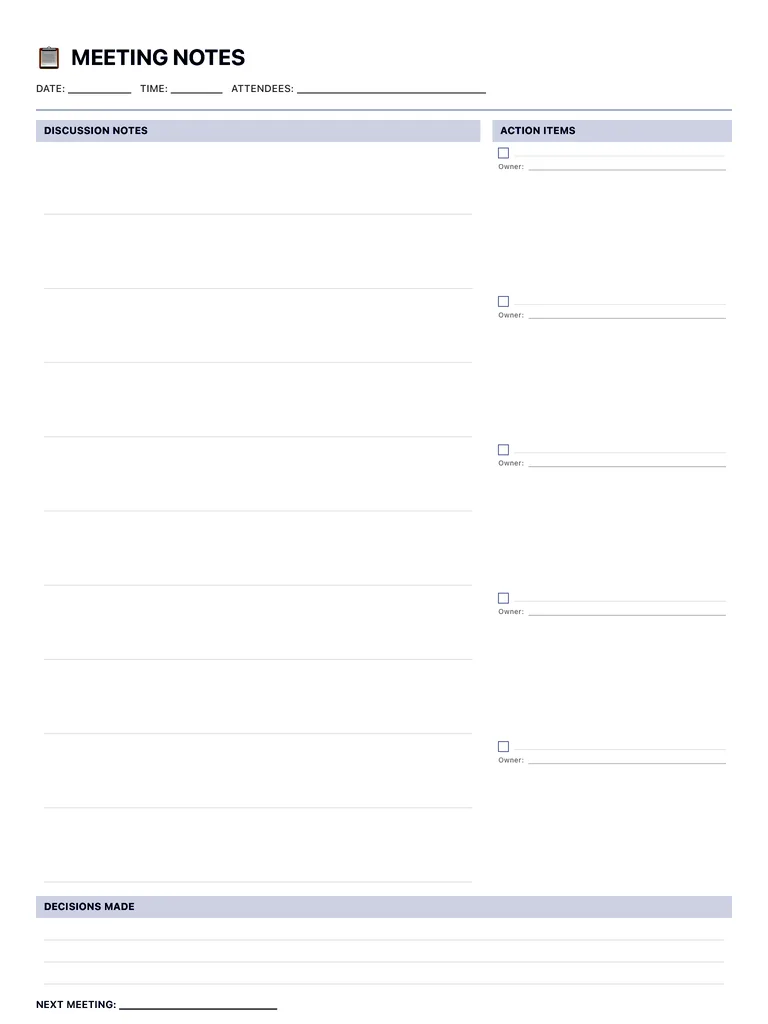
Write with Apple Pencil, a mouse or your finger. Your page is saved in this browser.

Use the Meeting Notes Template in Notes for iPad
Unlimited pages, 117 templates, notebooks, stickers, PDF import and export — made for Apple Pencil.
Frequently asked questions
What should meeting notes include?
At minimum: date and attendees, the main discussion points, decisions made, and action items with an owner and a due date. This template has a dedicated space for each.
What's the difference between meeting notes and meeting minutes?
Minutes are a formal record (often for boards and committees) with motions and votes; meeting notes are a practical summary of what was discussed and what happens next. This template works for both informal minutes and team notes.
Can I share my notes after the meeting?
In Notes for iPad you can export any page as a PDF and send it by email, AirDrop or any messaging app.