Eisenhower Matrix Template
Sort tasks into Do, Schedule, Delegate and Eliminate on one page, with checkboxes in every quadrant and space for key takeaways. Free PDF or fill it in with Apple Pencil.
Free · no sign-up · PDF works for printing and in any note app (Goodnotes, Notability, Notes for iPad). Premium template in the app.
About this template
Named after President Eisenhower, this decision-making framework separates what's truly important from what just feels urgent. Urgent+Important (DO): handle immediately — crises, deadlines. Important but Not Urgent (SCHEDULE): plan time for these — this is where growth happens. Urgent but Not Important (DELEGATE): hand these off when possible. Neither (ELIMINATE): stop doing these entirely. The key insight: most people spend too much time in Urgent quadrants and neglect the Important but Not Urgent work that creates lasting success.
How to use it
- Brain-dump every task first, then place each one in a quadrant.
- Be strict with “urgent”: it means it must happen today or this week.
- Block time in your calendar for the Schedule quadrant — that's where the important work lives.
Who it's for
- Professionals: Manage meetings & deadlines
- Students: Track classes, assignments & exams
- ADHD-Friendly: Clear structure helps maintain focus
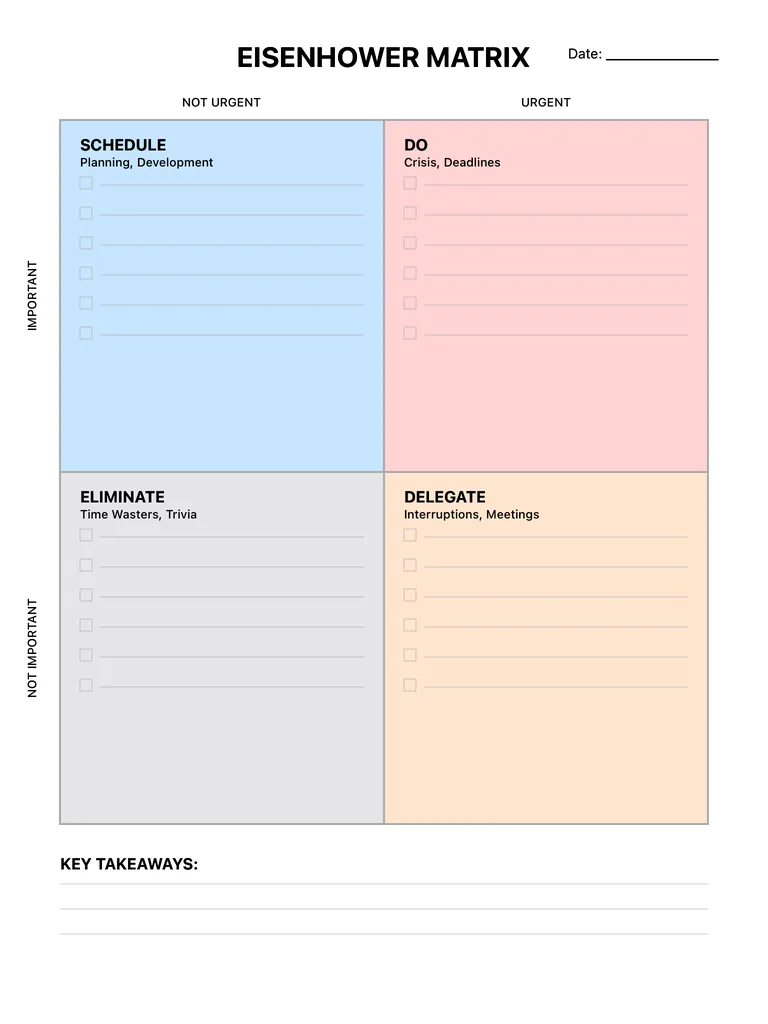
Write with Apple Pencil, a mouse or your finger. Your page is saved in this browser.

Use the Eisenhower Matrix Template in Notes for iPad
Unlimited pages, 117 templates, notebooks, stickers, PDF import and export — made for Apple Pencil.
Frequently asked questions
What are the four quadrants of the Eisenhower matrix?
Urgent and important (Do), important but not urgent (Schedule), urgent but not important (Delegate), and neither (Eliminate).
How often should I use it?
Most people fill one in weekly, and glance at it daily to pick tasks from the Do quadrant.