Vocabulary Template
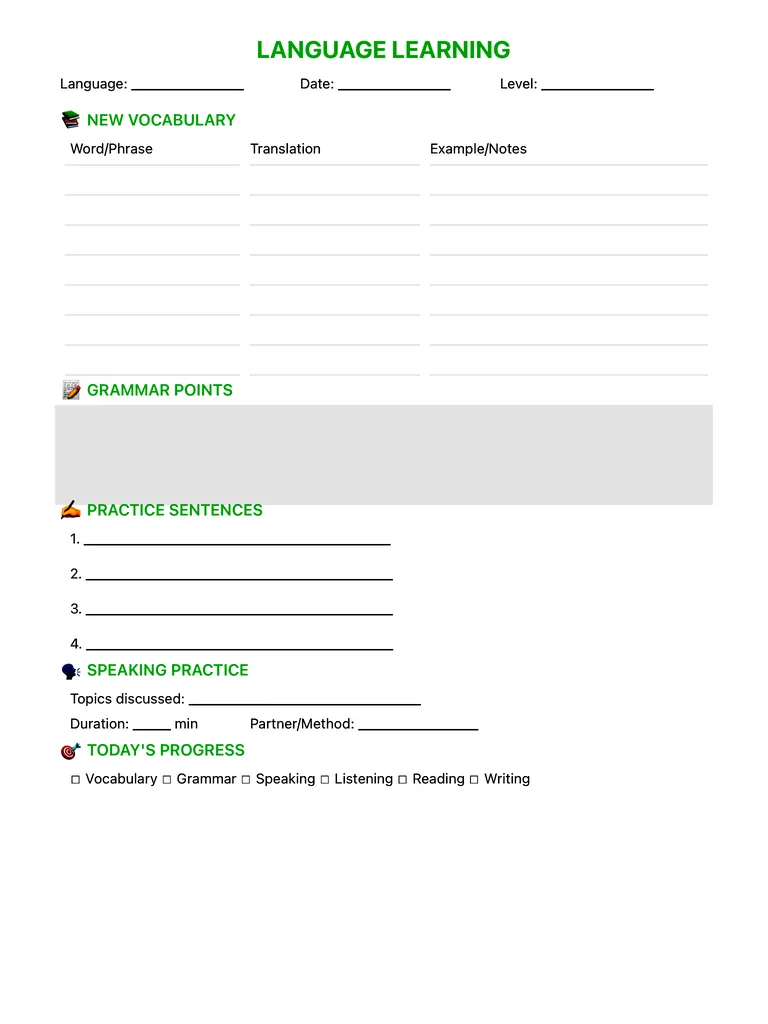
Track new words with translations and examples, grammar points, practice sentences and speaking practice, and tick off what you practised today. Free PDF or digital for Apple Pencil.
Free · no sign-up · PDF works for printing and in any note app (Goodnotes, Notability, Notes for iPad). Premium template in the app.
About this template
Learn languages the way your brain wants to learn them. Capture new vocabulary with translations AND example sentences — context is where real fluency lives. Dedicated grammar sections let you work through conjugations and sentence structures. Practice sentences force you to produce language, not just consume it. Track all four skills: speaking, listening, reading, and writing. The speaking practice log encourages conversation, which polyglots know is the fastest path to fluency. Build your personal language reference one daily session at a time.
How to use it
- Always write an example sentence — words stick better in context.
- Review the page after one day, three days and one week.
Who it's for
- Students: Track classes, assignments & exams
- ADHD-Friendly: Clear structure helps maintain focus
Write with Apple Pencil, a mouse or your finger. Your page is saved in this browser.

Use the Vocabulary Template in Notes for iPad
Unlimited pages, 117 templates, notebooks, stickers, PDF import and export — made for Apple Pencil.
Frequently asked questions
How many new words should I learn a day?
Most learners do well with 5–10 new words a day plus regular review of older ones.